Interphase Tech iSPAN User Manual Page 118
- Page / 236
- Table of contents
- TROUBLESHOOTING
- BOOKMARKS

- Users Guide 1
- Copyright Notice 3
- Disclaimer 3
- Trademark Acknowledgments 3
- Assistance 4
- Safety Precautions 5
- END-USER LICENSE AGREEMENT 7
- 1Contents 11
- 2Using This Guide 17
- Text Conventions 18
- Documentation Updates 19
- Driver Updates 20
- 1Introduction 21
- Hardware Overview 22
- Software Overview 23
- NDIS Driver 24
- Chapter 1: Introduction 25
- Software Features 26
- 8 Interphase Corporation 28
- Minimum System Requirements 29
- 10 Interphase Corporation 30
- 2Installing the Hardware 31
- Installing the Adapter 32
- Abcdefg Computers 33
- 14 Interphase Corporation 34
- 16 Interphase Corporation 36
- 18 Interphase Corporation 38
- 3Connecting to the Line 39
- DB25 Connector 40
- V.24 Interface 42
- 24 Interphase Corporation 44
- V.35 Interface 45
- 28 Interphase Corporation 48
- V.11 Interface 49
- 30 Interphase Corporation 50
- 25 --TEST Test In 50
- 7 - GND Ground Common 50
- 1 - Shield Shield Common 50
- Back-to-Back Configuration 52
- Connecting to the Network 53
- 34 Interphase Corporation 54
- 4Installing the 55
- NDIS Software Package 55
- Installing the Drivers 56
- 38 Interphase Corporation 58
- [drive]:\5535SR 59
- D:\5535SR). Then click OK 59
- 40 Interphase Corporation 60
- 42 Interphase Corporation 62
- 44 Interphase Corporation 64
- 46 Interphase Corporation 66
- Setting Up IPX/SPX Protocols 67
- 48 Interphase Corporation 68
- Setting Up TCP/IP Protocols 69
- 50 Interphase Corporation 70
- Removing the Drivers 72
- Removing the NDIS Driver 73
- 54 Interphase Corporation 74
- Removing the Base Driver 76
- Completing the Driver Removal 78
- Removing the Base Driver Only 79
- Add/Remove 80
- • Cleans up the registry 82
- 5 Setting Up the NDIS 83
- Adapter Functions 86
- Channels Functions 87
- Adding a Logical Adapter 89
- Properties 91
- 72 Interphase Corporation 92
- 74 Interphase Corporation 94
- 76 Interphase Corporation 96
- Setting Up General Properties 97
- Setting Up LAN Properties 98
- Setting Up WAN Properties 100
- PPP WAN Properties 101
- 82 Interphase Corporation 102
- X.25 WAN Properties 103
- 84 Interphase Corporation 104
- Frame Relay WAN Properties 105
- Setting Up Port Properties 106
- PPP Serial Port Properties 107
- X.25 Port Properties 108
- Frame Relay Port Properties 109
- Interphase Corporation 110
- Viewing Channel Status 111
- Manually Connecting a Channel 113
- 6 Logging NDIS Driver 115
- Accessing Online Help 116
- Starting the NDIS Driver Log 116
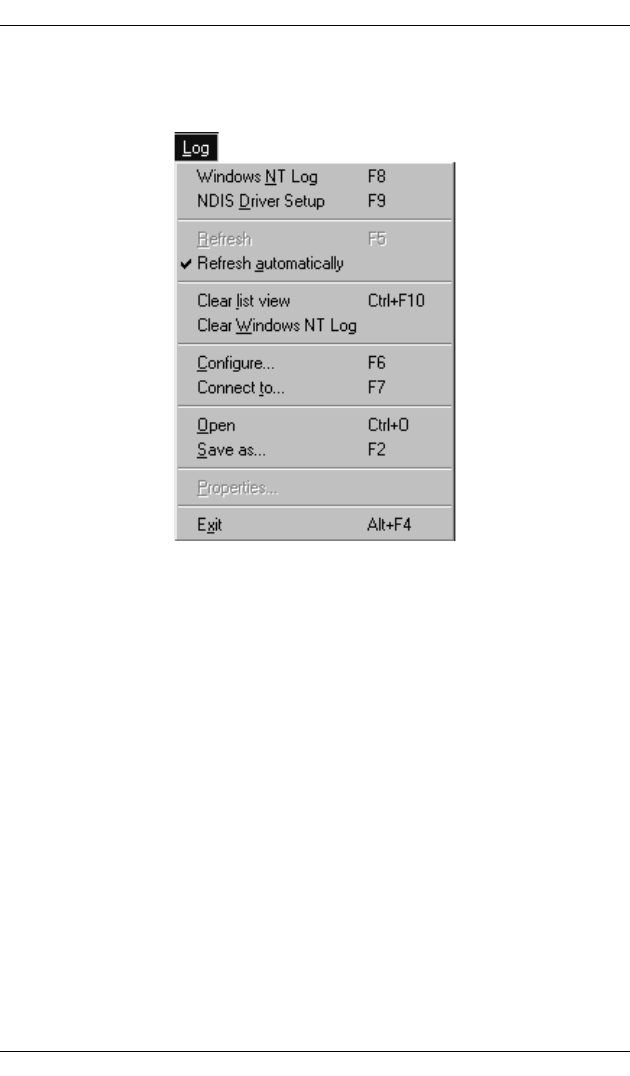
- Log Menu 118
- Parameters Menu 119
- 100 Interphase Corporation 120
- 102 Interphase Corporation 122
- 104 Interphase Corporation 124
- Icon Event 124
- Successful connection 124
- 106 Interphase Corporation 126
- 7Installing SNA Server 127
- Link Services Software 127
- Installing the Base Driver 128
- Running the Setup Program 129
- 112 Interphase Corporation 132
- 114 Interphase Corporation 134
- 3. Click Continue 135
- 116 Interphase Corporation 136
- D:\5535SR) 137
- 118 Interphase Corporation 138
- Removing Base Driver Software 139
- 120 Interphase Corporation 140
- 122 Interphase Corporation 142
- 8Setting up SNA Server 143
- Link Services 143
- Services 145
- 126 Interphase Corporation 146
- 128 Interphase Corporation 148
- 130 Interphase Corporation 150
- 132 Interphase Corporation 152
- 134 Interphase Corporation 154
- 136 Interphase Corporation 156
- 138 Interphase Corporation 158
- Inserting a Connection 159
- 140 Interphase Corporation 160
- 144 Interphase Corporation 164
- 9Setting up Firmware 165
- Firmware Management 168
- 152 Interphase Corporation 172
- 154 Interphase Corporation 174
- 156 Interphase Corporation 176
- 158 Interphase Corporation 178
- Hardware Management 179
- 162 Interphase Corporation 182
- 164 Interphase Corporation 184
- 10Troubleshooting 185
- Problems and Solutions 186
- Chapter 10: Troubleshooting 187
- ASpecifications 189
- Storage Environment 190
- B SynWatch Utility 191
- Starting SynWatch 192
- Appendix B: SynWatch Utility 193
- Watching the Serial Port 194
- Changing Watch Parameters 195
- 176 Interphase Corporation 196
- 178 Interphase Corporation 198
- Saving and Editing Frames 200
- CQuick Reference of 201
- Common Tasks 201
- Procedures 202
- Figure C-2. Devices List 203
- DProtocols Overview 205
- Layer 2: Frame Level Layer 206
- Layer 3: Network Layer 206
- Logical Channels 206
- Frame Relay Protocol 207
- PPP Protocol 208
- EPCI/PMC Technology 209
- Overview 209
- 190 Interphase Corporation 210
- FRegulatory 211
- Statements 211
- Canadian 212
- Accessory 213
- 194 Interphase Corporation 214
- Glossary 215
- 212 Interphase Corporation 232
Related products and manuals for Software Interphase Tech iSPAN
 (168 pages)
© 2020, manymanuals.com. All rights reserved. | 0.032 s |
 Manymanuals.com
 Manymanuals.de
 Manymanuals.fr
 Manymanuals.it
 Manymanuals.pl
 Manymanuals.cz
 Manymanuals.es
 Manymanuals-pt.com
Comments to this Manuals